PSIT Attendance Calculator
Related
📊 PSIT Kanpur Attendance Calculator: Track, Plan, and Stay Above 90%

Never miss the 90% threshold again – visualize your path to success with our interactive attendance tracker
If you study at PSIT Kanpur, you already know how crucial attendance is. Most departments enforce a 90% attendance requirement, and falling below it can affect exam eligibility, internal marks, and overall academic standing. The PSIT Attendance Calculator helps you track your current percentage and plan your future absences or delegations so you stay safely above the threshold.
What this calculator does
- Current Attendance: Calculate your attendance percentage using your total academic days, absences, and delegations (official duties/approvals that count as present).
- Future Planning: Estimate how many more days you can miss (absent or on delegation) and still maintain 90% by the end of the term.
How attendance is calculated at PSIT (Pranveer Singh Institute of Technology
Based on the commonly used formula at PSIT:
- T = Total Academic Days
- A = Total Absent Days
- D = Total Delegations (e.g., official events, OA, recognized by the institute)
Attendance percentage:
Attendance% = ((T − A + D) / T) × 100
Key points:
- Delegations add to the numerator (they count like present, not extra classes).
- Final value is capped between 0% and 100%.
- Always confirm department-specific rules (e.g., medical leaves, late marks, subject-level rules).
How to use the calculator
There are two tabs in the tool:
1. Current Attendance
- Enter Total Academic Days (T): Total classes conducted so far.
- Enter Total Absent Days (A): All missed classes to date.
- Enter Total Delegations (D): Recognized/approved delegations to date.
- Click Calculate Attendance.
You’ll see: - Your attendance percentage with a progress bar (green/yellow/red).
- A bar chart showing:
- Attended (Present + Delegated) days in blue
- Absent days in red
- A 90% target line in orange for quick comparison
2. Future Planning
Use this when you want to know how many more days you can miss and still remain at or above 90%.
- Enter Future Academic Days (F): Estimated upcoming working/teaching days.
- Enter Future Delegations (FD): Expected official delegations in the future.
- Click Estimate Allowable Absences.
The calculator returns the maximum number of days you can be absent (or take as delegation) while maintaining 90%.
Math behind Future Planning
Variables:
- T = current total academic days
- A = current absences
- D = current delegations
- F = future academic days
- FD = future delegations
- x = allowable future absences you can still take
- Target attendance p = 0.90 (90%)
Condition:
(T + F − A − x + D + FD) / (T + F) ≥ 0.90
Rearranging:
x ≤ 0.10 × (T + F) − A + (D + FD)
We round down to whole days:
allowable = floor(0.10 × (T + F) − A + D + FD)
If the result is negative, the allowable absences are 0.
Examples
Example 1: Current Attendance
- Total Academic Days T = 150
- Absent Days A = 10
- Delegations D = 2
Attendance% = ((150 − 10 + 2) / 150) × 100 = (142 / 150) × 100 ≈ 94.67%
Result: You are above the 90% threshold. The graph will show Attended = 142 days, Absent = 10 days, and an orange 90% line at 135 days (90% of 150).
Example 2: Future Planning
- Current totals: T = 150, A = 10, D = 2
- Future: F = 40, FD = 2
allowable = floor(0.10 × (150 + 40) − 10 + (2 + 2))
= floor(0.10 × 190 − 10 + 4)
= floor(19 − 10 + 4)
= floor(13)
= 13 days
Result: You can be absent up to 13 more days (including any delegations counted as present) and still maintain 90% by the end.
Interpreting the results
- Progress bar:
- Green: ≥ 90% (safe zone)
- Yellow: 75–90% (be cautious)
- Red: < 75% (high risk)
- Bar graph:
- Blue bar: Attended (Present + Delegated)
- Red bar: Absent days
- Orange line: 90% threshold in days
If your blue portion (attended) is below the orange line, you’re below 90%.
What counts as a Delegation?
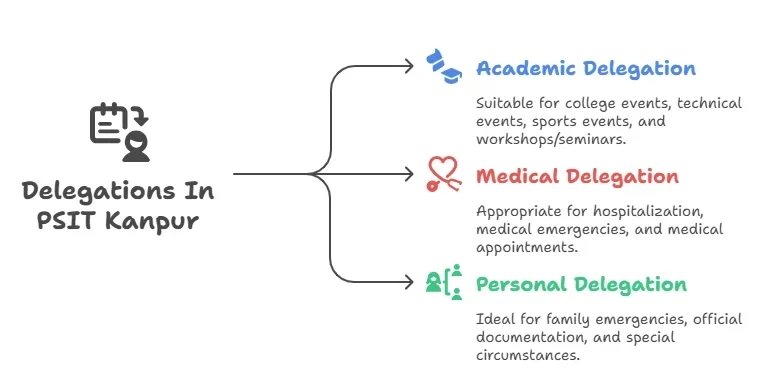
“Delegation” generally means officially sanctioned duties or institute-approved activities (competitions, events, OA) that count as present. Policies can vary by department and semester—always verify with your department or the Dean’s office. The calculator assumes approved delegations count in the numerator.
Common mistakes to avoid
- Using total calendar days instead of academic/teaching days. Only enter days when classes were conducted.
- Forgetting to add legitimate, approved delegations.
- Mixing subject-level attendance with overall attendance. This calculator estimates overall attendance; individual course requirements may differ.
- Entering future days unrealistically; use the academic calendar for accurate planning.
Tips to stay above 90%
- Monitor early: Small deficits are easier to fix mid-semester than in the final weeks.
- Be realistic with future days and delegations—use the official calendar.
- If you’re close to 90%, attend consistently until you create a buffer (92–95%).
- Keep documentation for delegations and ensure they’re recorded by your department.
Why This Calculator Matters for PSIT Students
At PSIT Kanpur, maintaining 90%+ attendance is non-negotiable for exam eligibility. But manually calculating attendance percentages and planning absences is error-prone and stressful. Our PSIT Attendance Calculator solves this with:
✅ Real-time visualizations of your attendance trajectory
✅ Dynamic planning for future absences/delegations
✅ Intuitive UI that makes complex calculations effortless
✅ Mobile-friendly design for on-the-go access
🚀 Why This Beats Manual Calculations
| Manual Method | PSIT Attendance Calculator |
|---|---|
| ❌ Error-prone (human calculation) | ✅ Automatic calculations with decimal precision |
| ❌ No visual feedback | ✅ Trajectory graph shows real-time risk zones |
| ❌ Can’t plan future absences | ✅ Simulates “what if” scenarios instantly |
| ❌ No mobile optimization | ✅ Works flawlessly on phones/tablets |
| ❌ Time-consuming | ✅ Takes 10 seconds to get results |
FAQs
Q: Is 90% mandatory for all departments?
A: 90% is a common benchmark, but some departments/courses may vary. Always check your official notices.
Q: Do medical leaves count like delegations?
A: It depends on policy and approvals. If recognized like official leave, they may be counted as present. Confirm with your department.
Q: Can I exceed 100% attendance?
A: No. The calculator caps at 100% even if delegations are high—it reflects practical limits.
Q: Is my data stored?
A: No. Everything runs in your browser (client-side). No data leaves your device.
💡 “This tool saved me during mid-terms. I saw exactly how many absences I could afford before crossing the 90% threshold.”
– Rajesh Kumar, B.Tech CSE, PSIT Kanpur
📌 Real-world use case:
“I had 3 medical leaves coming up. The calculator showed I could take 2 more absences without penalty – saving me from panic!”
– Ankit Patel, B.Tech ECE, PSIT Kanpur
💡 The trajectory graph is the game-changer:
“I used to stress about whether I could skip a class. Now I see the exact impact on my attendance percentage before I decide.”
– Meera Singh, B.Tech CSE, PSIT Kanpur